Paste a test in as text
If your test already exists as a document, you don’t need to type it again. Copy the questions, paste them into AutoMarkHQ, and it sorts them into questions, answer keys and marks for you to check. Nothing joins your test until you choose which questions to add, and every answer it picked up is marked for you to confirm.
Where to find it
Section titled “Where to find it”Pasting is part of creating a new test. On an empty new test, choose Paste it from the three ways to start. Once you’ve added some questions, use the Paste a whole test link above the question list. Questions you paste there are added after the ones you already have, and numbering carries on from them.
Pasting your questions
Section titled “Pasting your questions”Paste into the left side of the Paste questions window. A moment later, the questions AutoMarkHQ picked up appear on the right, one card each, showing:
- the question’s number and wording;
- the type AutoMarkHQ thinks it is: multiple choice, true/false, numeric or short answer;
- the answer it picked up for your key, or a dash if it didn’t find one;
- for multiple choice, the lettered choices it kept.
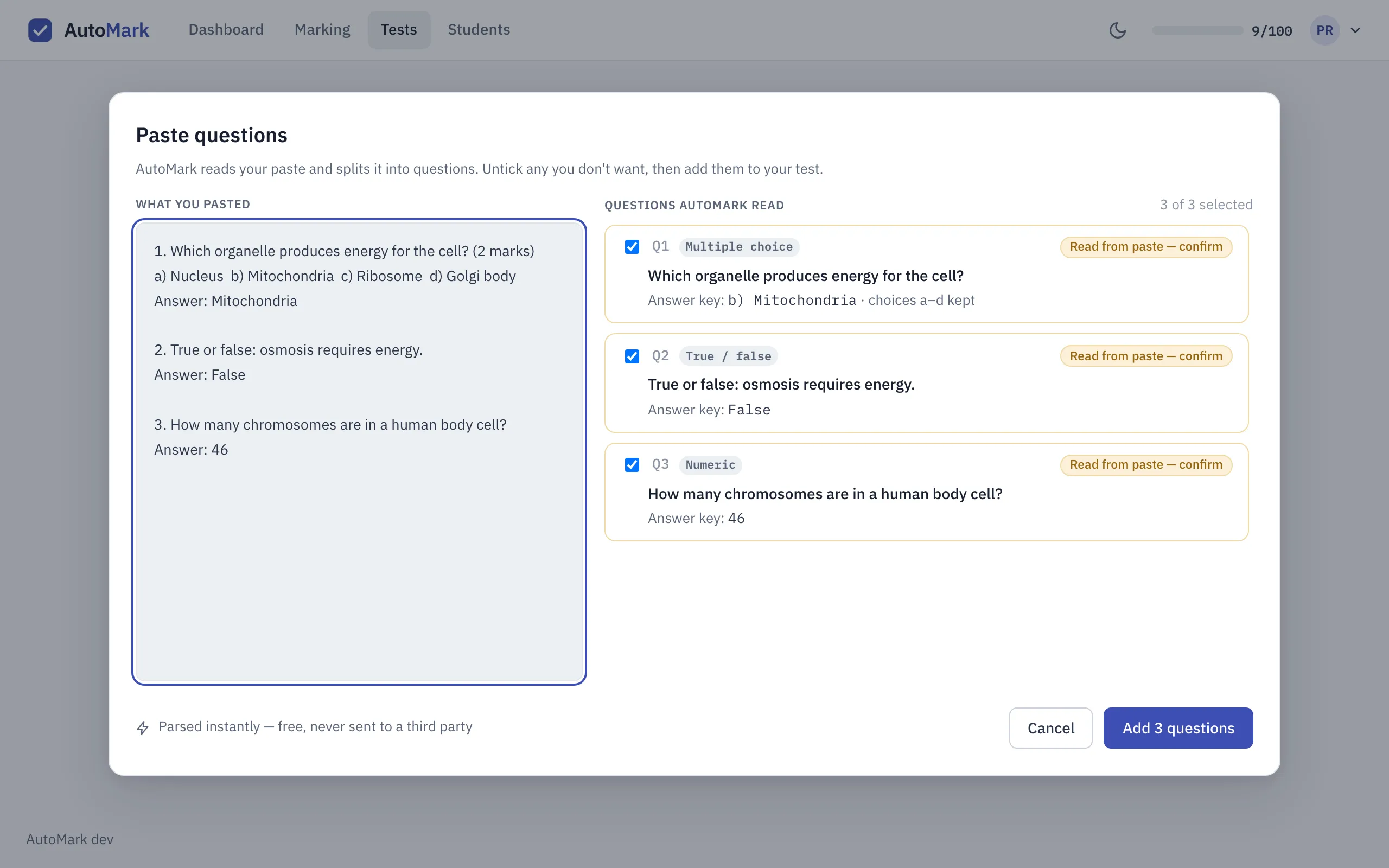
Untick any card you don’t want, then choose Add questions. The button shows how many you’ve ticked.
Laying out your text so it pastes cleanly
Section titled “Laying out your text so it pastes cleanly”AutoMarkHQ goes by the layout of your document, so a little structure goes a long way:
- Number every question:
1.,1)orQ1.. AutoMarkHQ finds questions by their numbers, so it finds none in text without numbering. - Put each answer straight under its question on a line starting
Answer:. AutoMarkHQ reads an answer list at the end of the document as more questions. - Letter your choices:
a),B.or(c), on one line or several. The answer can be the letter or the choice’s text. - Write marks next to the question, like
(2 marks). Without them, each question is worth one mark.
1. Which organelle produces energy for the cell? (2 marks)a) Nucleus  b) Mitochondria  c) Ribosome  d) Golgi bodyAnswer: Mitochondria
2. True or false: osmosis requires energy.Answer: False
Checking what came in
Section titled “Checking what came in”The pasted questions join your test like any you typed. Each answer AutoMarkHQ picked up carries a Read from paste — confirm label. Click Looks right when it’s correct, or change the answer, and the label goes away. Multiple choice questions arrive with their choices filled in and, if AutoMarkHQ found the answer, it’s already selected.
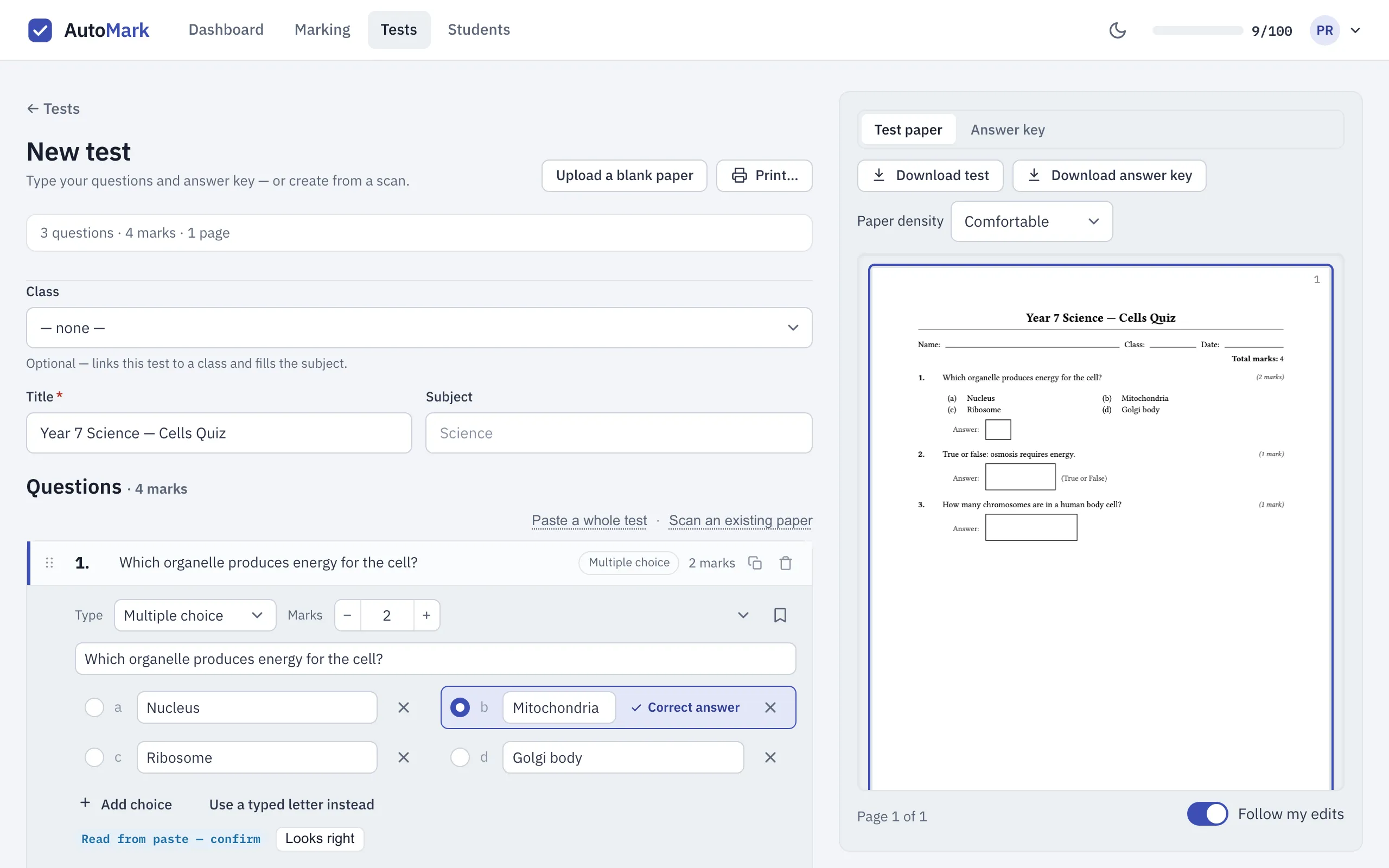
The label is a reminder, not a lock: you can save the test without clearing every one. It’s worth a look down the list before you print, because AutoMarkHQ reads the layout of your text, not its meaning, and some things are worth checking:
- Question types are a best guess. A maths question can come in as short answer, and a question that needs a longer written response always comes in as short answer. Change the type on the question.
- Missing answers. A question whose answer AutoMarkHQ didn’t find has an empty key. Fill it in.
- Extra questions. If AutoMarkHQ made a question out of something that isn’t one, delete it.
Your test is only saved when you choose Create test.