Question type suggestions
Each question type marks in its own way. A numeric question compares values, so 107 and 107.0 earn the same mark. A short-answer question matches the words as written, so they don’t. When the answer key you type looks like it belongs to a different type, AutoMarkHQ tells you while you’re still writing the test, before any paper is marked against it.
A suggestion is advice. AutoMarkHQ never changes a question’s type by itself: the type changes only when you click to change it, and nothing is kept until you save the test (the wording you type can still be sent for a suggestion before then; see Suggestions from the question wording).
Where suggestions appear
Section titled “Where suggestions appear”A moment after you stop typing, a small marker appears beside any question AutoMarkHQ has a suggestion for, and the summary bar above your questions shows how many there are. Click the count to jump to the first one.
On a wide screen, the suggestion sits in the left margin beside its question, the way a comment sits beside a paragraph. Click the marker to bring it forward. On a narrower screen it opens under the question instead.
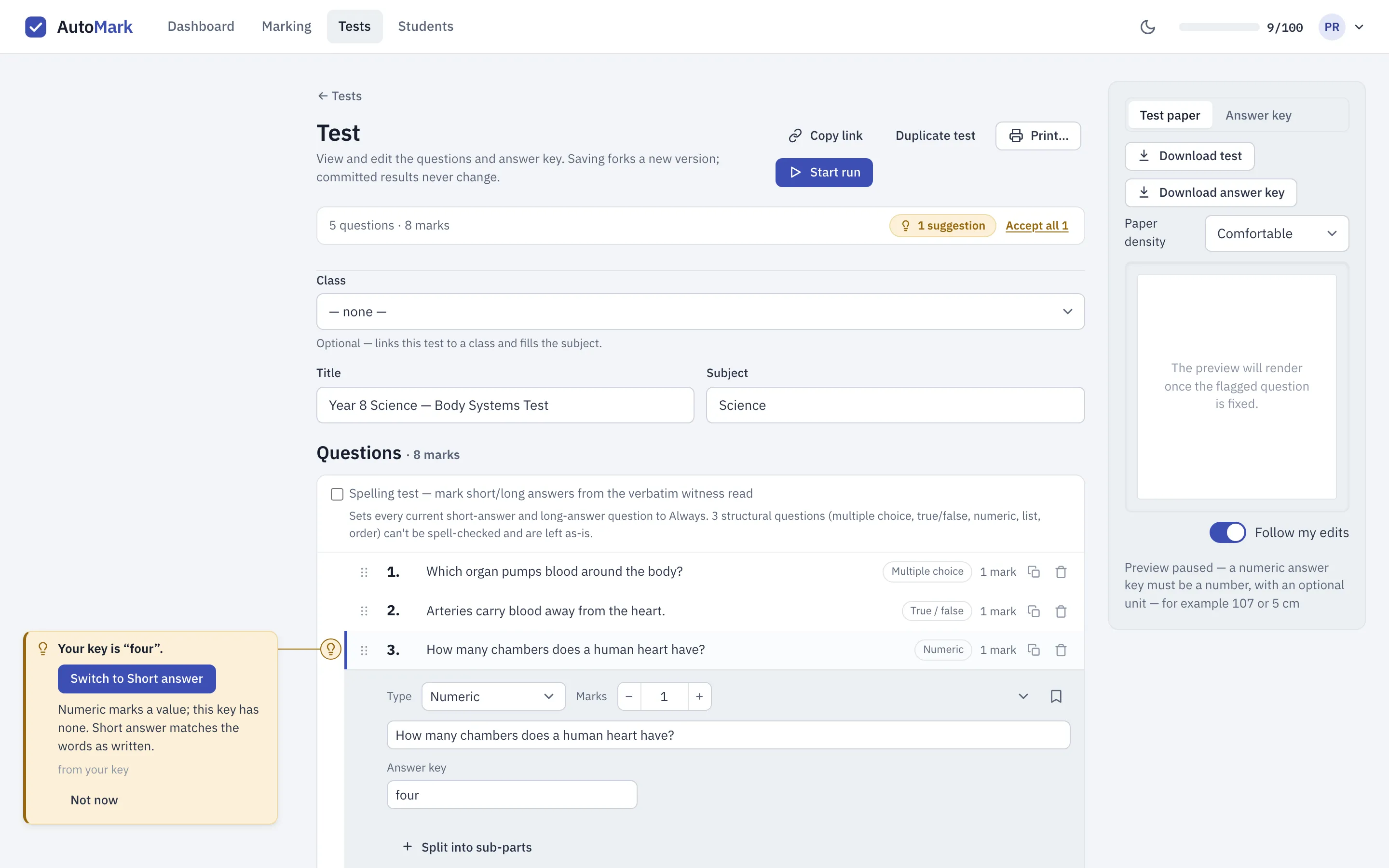
Each note says what AutoMarkHQ noticed, explains in a sentence how the two types mark differently, and says what the suggestion is based on: from your key, or from the question wording.
What you can do with a suggestion
Section titled “What you can do with a suggestion”- Switch to a type: usually offered when the change loses nothing, so your key, alternatives and marks carry over as they are.
- Use a number: offered when a numeric key has words around a single number (
answer: 107). It changes the key to only the number and keeps the question numeric. - Show me the type picker: offered when changing type would need something from you first, such as writing the choices for a multiple-choice question. It takes you to the question’s type picker and the decision stays yours.
- Not now: hides the suggestion until you change that question again.
Accept all in the summary bar applies every suggestion that loses nothing, in one go. A suggestion that needs your input stays where it is for you to look at. Either way the change is an ordinary edit: review it, then save the test as usual.
What AutoMarkHQ looks for
Section titled “What AutoMarkHQ looks for”| Your question is | Your key is | AutoMarkHQ suggests |
|---|---|---|
| Numeric | words with no number in them, such as four or blue |
Short answer |
| Numeric | a number with words around it, such as answer: 107 |
Using only the number, or Short answer |
| Short answer | a number, with or without a unit, such as 107 or 5 cm |
Numeric |
| Short answer | true, false, yes or no |
True/false |
| Short answer | a single letter from A to H, with no choices written | Multiple choice |
| Short answer | a long key, eight words or more | Long answer |
One note is information only. A numeric question keyed with a fraction, such as 3/4, is marked
on its value, so 0.75, 6/8 and 3/4 all earn the mark. If you want only the fraction as written to
count, a short-answer question does that. AutoMarkHQ tells you this and leaves the type alone.
Suggestions are made only for numeric and short-answer questions. Every other question type, including lists, ordering, fill-in-the-blank, tables, matching and diagrams, doesn’t get them.
Suggestions from the question wording
Section titled “Suggestions from the question wording”Sometimes the key alone doesn’t settle it. A short-answer question that asks students to explain their reasoning is usually better as a long answer, even if its key is a single word. For numeric and short-answer questions the key can’t decide, AutoMarkHQ can also read the question’s wording. Those notes say from the question wording.
To do this, AutoMarkHQ sends the question’s wording, its type, your answer key and any accepted answers to an outside provider, as you type them, before you save. AutoMarkHQ adds nothing about your students, but what you type is sent as written, so leave student names out of questions and keys. Text you later change may already have been sent. These suggestions need a verified email address on your account. Suggestions from your key don’t need one. The subprocessors page, which is part of our privacy policy, lists the providers we use and what each one receives.
AutoMarkHQ can misjudge a question. If a suggestion doesn’t fit, choose Not now and keep the type you picked.