The review queue
After a marking run, the answers AutoMark verified and matched against your key are marked automatically. The review queue holds the rest: every answer it wasn’t willing to mark without you. Working the queue is a glance and a decision per card — anything AutoMark wasn’t sure of came to you first, and nothing is recorded until you commit the run.
What lands in your queue
Section titled “What lands in your queue”AutoMark checks each reading it makes against the handwriting on the scan. That check either passes or it doesn’t — there’s no in-between — and an answer is flagged for you when:
- AutoMark couldn’t verify its reading of the answer;
- the answer it read doesn’t match your key — every answer marked wrong is shown to you before anything is recorded;
- it could only award part of the marks, or couldn’t make the answer out at all;
- a written answer isn’t one your key accepts.
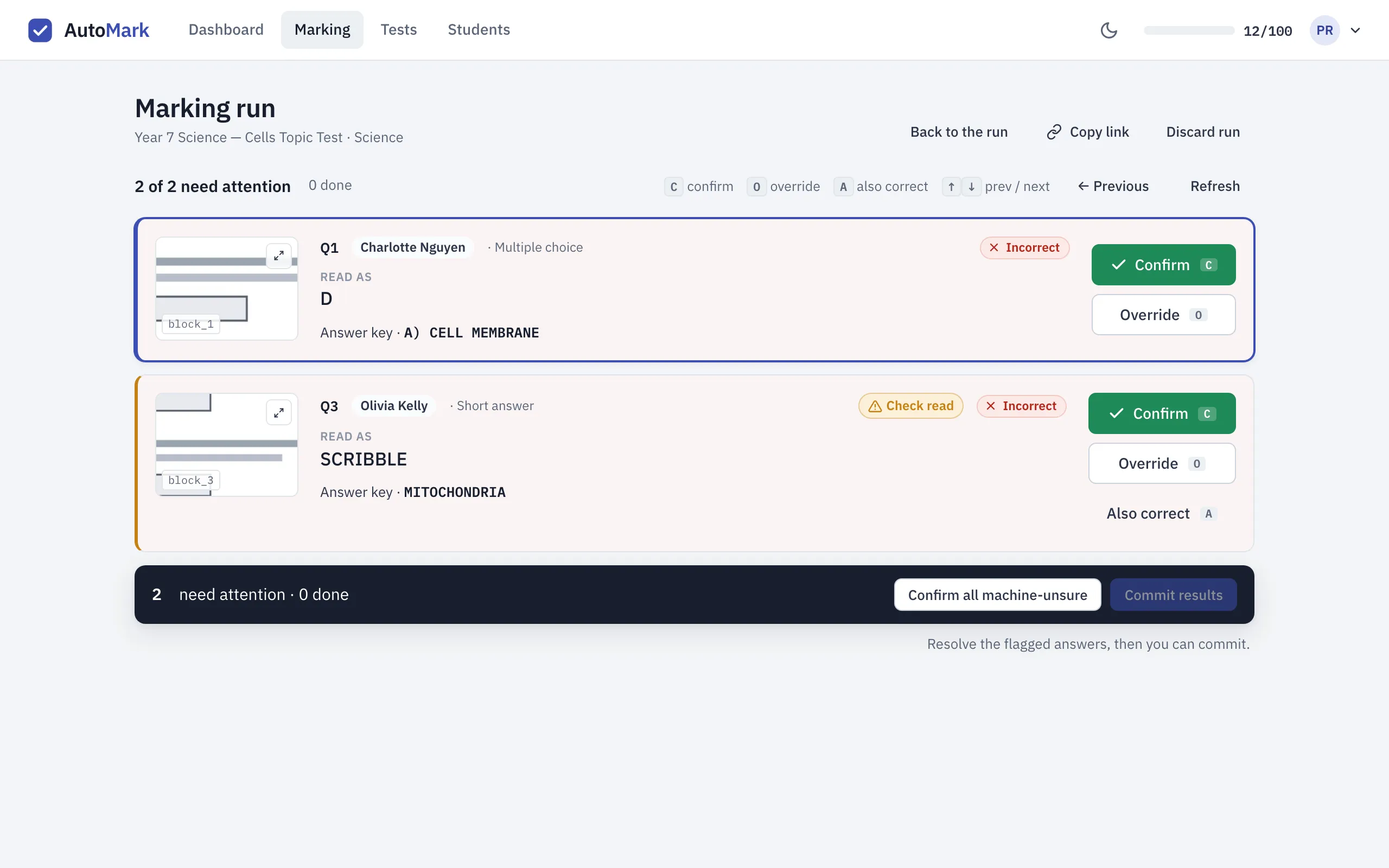
A flag isn’t a verdict. It means AutoMark would rather ask you than guess, and each card says why it’s asking — Check read means the reading itself needs your eyes; Incorrect means the reading didn’t match your key.
Reading a card
Section titled “Reading a card”Each card puts one decision in one place: the crop of the student’s actual paper, what
AutoMark read it as, your answer key, and whose paper it is. Press E to enlarge the crop —
you can confirm or override from the enlarged view too.
One habit worth forming: the crop is the truth. “Read as” is AutoMark’s reading of the ink, and if the reading and the ink disagree, the ink wins — override and move on. That’s what the crop is there for.
Three ways to resolve an answer
Section titled “Three ways to resolve an answer”- Confirm (
C) — the reading and the mark are right. Take them and move to the next card. - Override (
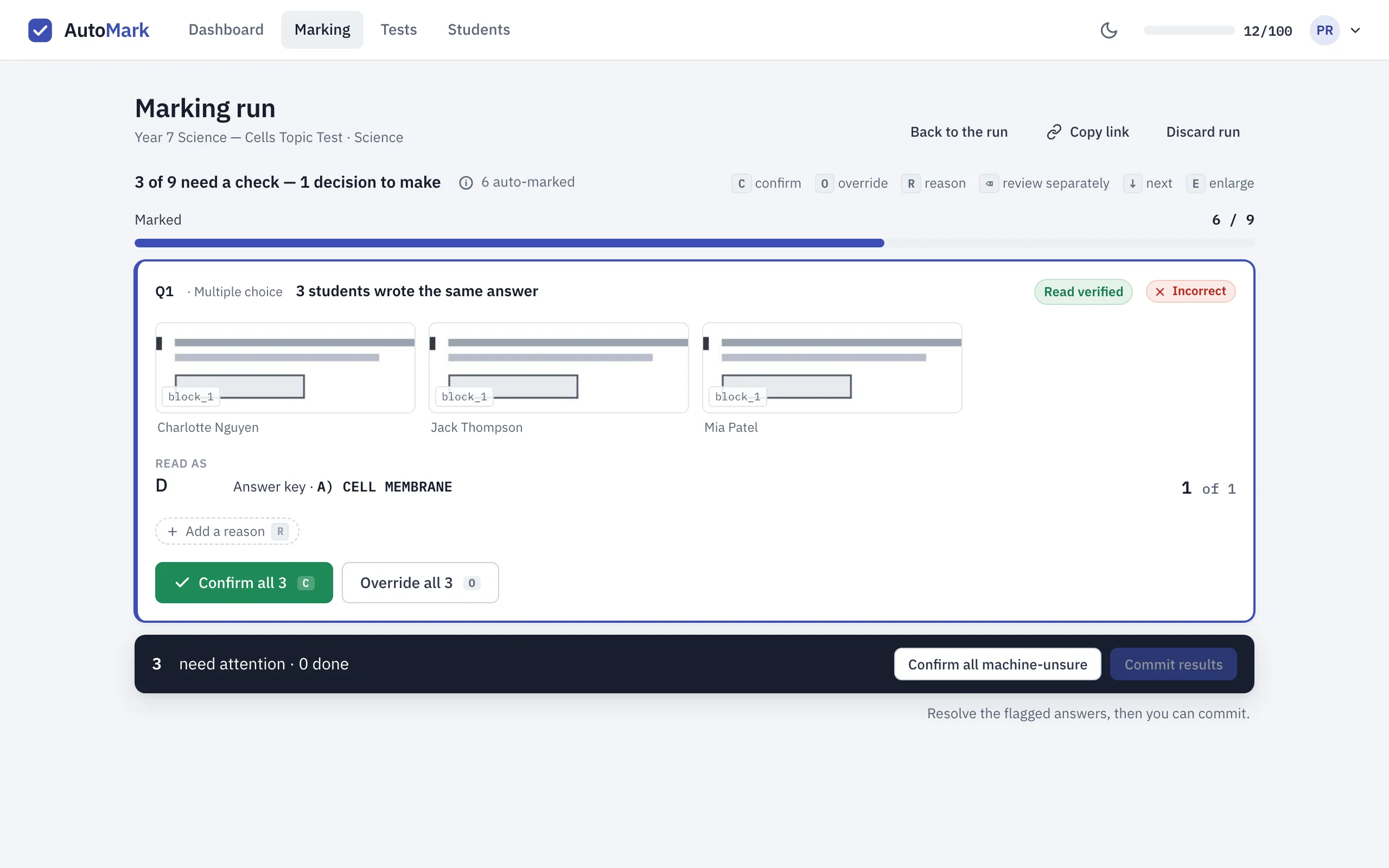
O) — set the mark yourself. Overriding asks for a reason: type one — say, no units with a mark taken off — and it’s saved for that question, so the next time you make the same call it’s a single keystroke. You can also adjust the marks without a reason. A reason keeps your marking consistent across the class and records why a mark changed. - Also correct (
A) — the student’s written answer is fair, but your key didn’t list it. This adds it to the key and re-marks everyone in the run against it, so that answer won’t be marked wrong again for anyone in the run.
Changed your mind after resolving? A resolved card can be changed, or sent back to the queue, any time before you commit.
When several students write the same thing
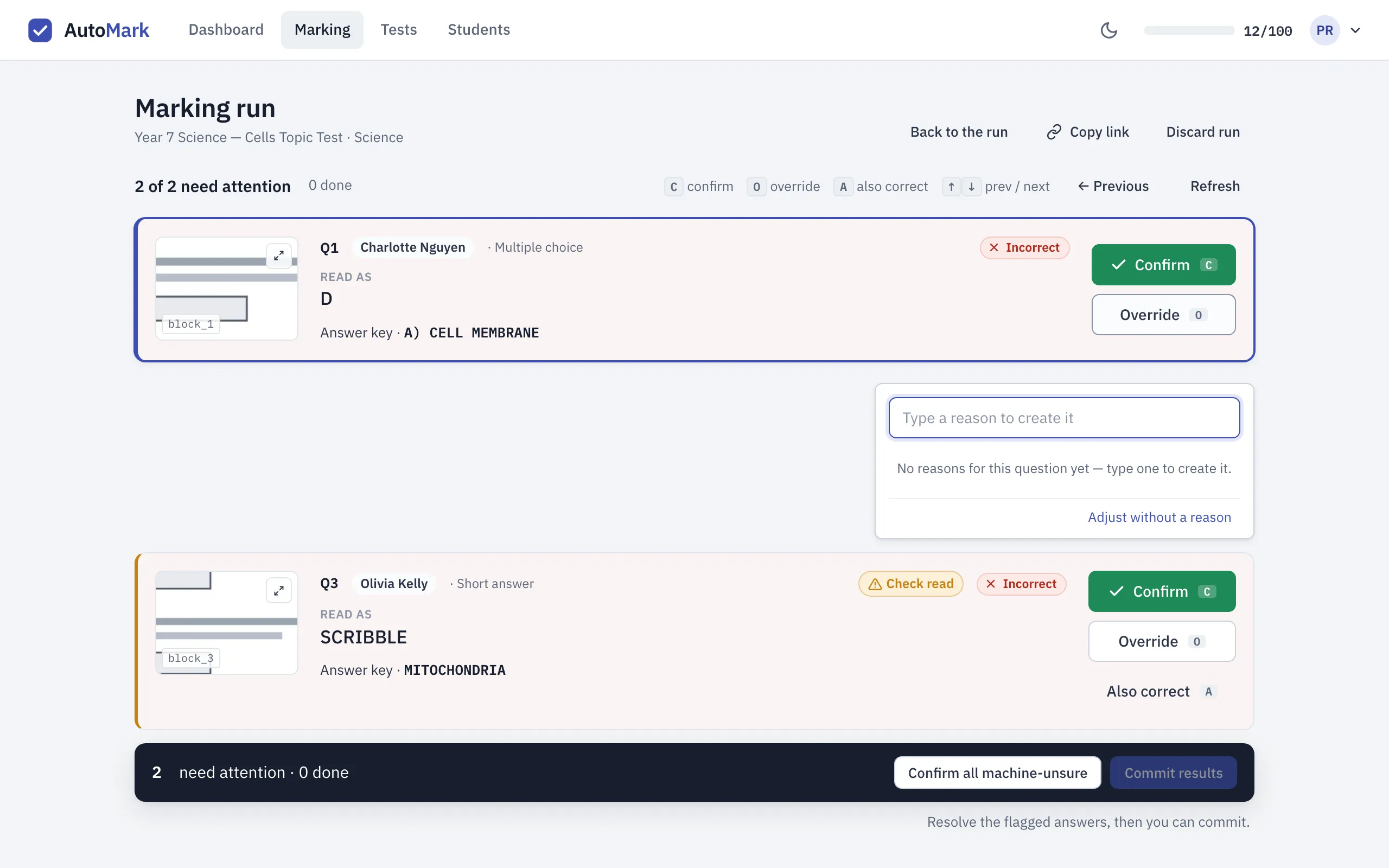
Section titled “When several students write the same thing”If the same flagged answer turns up on more than one paper, the queue folds those papers into a single card: every student’s crop side by side, and one decision that applies to all of them. The header keeps count both ways — how many answers need a check, and how few decisions that actually is.
You’re still deciding on evidence, not on trust: each crop is on the card, and if one student’s answer deserves its own look, Review separately pulls it out into its own card.
Correct the reading, or record a blank
Section titled “Correct the reading, or record a blank”Use Enter answer to type what the student actually wrote when AutoMark missed or misread it. If the card offers different readings, choose one only after checking it against the crop. Use No answer given when the student left the answer blank or crossed it out without replacing it. Do not type an answer from the key into a blank response.
A corrected reading and a changed mark are separate decisions. A correction can change the proposed mark; if the answer returns to the queue, inspect it and confirm it. Your correction is recorded alongside the original reading.
For a question assessing spelling, set Spelling counts when preparing the test. For spelling-sensitive questions, inspect the letters on the paper even when a proposed reading looks like a correctly spelled word. A second reading can help find disagreement, but it does not replace your judgement. Long answers that need manual judgement still need you to award the marks.
Inspect one answer in a group
Section titled “Inspect one answer in a group”Enlarge a group member’s crop to read that student’s answer. Use the previous and next controls, or the left and right arrow keys, to move through the group’s answers. Check the student name as you move. See whole page gives more context; return to the crop to continue the comparison.
Use Review separately if one response needs a different decision. A grouped correction or decision applies to the members shown in that group, so inspect those members before applying it. Saved reasons help repeat the same marking judgement for the question; they do not establish that different handwriting says the same thing.
Check every answer before committing
Section titled “Check every answer before committing”Choose Check every answer to inspect results beyond the flagged queue, including answers already confirmed or marked automatically. Select a student and inspect the reading, scan and mark. Re-open sends an answer back to review; it must be resolved again before committing. This is useful if you cancel the commit digest because something needs another look.
One answer key for this run
Section titled “One answer key for this run”A run keeps the marking rules it started with. Editing the test for a future class does not silently change those rules. Also correct is an explicit exception: it accepts another answer for the version being reviewed and re-marks the run. Check that it is fair for the question before using it.
If an open run prevents deleting a question, open the run named in the message and decide whether to finish or discard it. Discarding is not the same as recording its marks.
Finishing the run
Section titled “Finishing the run”Once you’ve worked through the queue, two buttons finish the job:
- Confirm all machine-unsure accepts every remaining flagged reading at once — useful when you’ve eyeballed the queue and the readings are all sound.
- Commit results writes the marks to your students’ records. It stays locked until every paper has finished marking and every flagged answer is resolved, so a half-checked run can’t be recorded by accident.
If a run comes back with nothing flagged, you’ll see All marked — nothing to check and can commit straight away. Either way, nothing reaches a student’s record until you commit — the whole run stays a draft, and every mark in it stays yours to change, until then. The commit step itself is covered in Your first marking run.
Keyboard first
Section titled “Keyboard first”The queue is built to be worked without the mouse: C confirm, O override, A also
correct, ↑/↓ to move between cards, E to enlarge the scan. The active card follows
you down the page as you go.
If far more landed in your queue than you expected, AutoMark probably found the scan hard to read — see Troubleshooting for what helps it read a scan well.
Correct a recorded result
Section titled “Correct a recorded result”Open the student’s paper from a committed run. Use Correct mark for a marking change. Use Correct reading for a transcription error: enter the actual answer or select No answer given, then Check the proposed reading, verdict and mark before confirming. Cancel if the proposal is not the result you intend.
A reading correction can replace a mark you previously corrected by hand; review the proposal carefully and use Correct mark afterwards if needed. For a long answer, correcting the transcript leaves the manually awarded mark alone. These corrections remain recorded changes to a committed result; they do not silently reopen the whole run. A paper assigned to the wrong student has a separate reassignment action.